How to Turn Light Novels Into Audiobooks Using AI
Ever wish you could listen to your favorite light novel on your commute after finishing the latest volume? While you wait for an official audiobook that might never come, the story sits locked on the page. But thanks to new AI tools, you can create your own personal version to enjoy anywhere, anytime.
Forget the robotic computer voices of the past. Today's AI can perform incredible storytelling, analyzing text to deliver lines with genuine emotion. This isn't a project for tech experts; it's for fans. If you can copy and paste, you have the skills to bring your favorite characters to life.
Your Simple Toolkit: Two Ingredients
The process requires just two things:
- The Book's Text: The story itself, extracted from a digital version (like an EPUB file).
- An AI Voice Tool: A website that takes your text and reads it aloud in a human-like voice.
Step 1: Extracting the Text
Most digital light novels come as EPUB files. To get the "script" for your audiobook, you need to extract the raw text.
- The Tool: Use Calibre, a free digital library manager.
- The Process: 1. Add your EPUB file to Calibre. 2. Click the "Convert books" button. 3. Set the output format to Plain Text (.txt).
- Result: This strips away formatting and gives you a clean file for the AI to read.
Step 2: Finding the Perfect AI Voice
Modern AI voice generators interpret punctuation and context, adding excitement to battles or pauses to monologues.
Popular AI Narrators:
| Service | Best For | Price Tier |
|---|---|---|
| ElevenLabs | Most realistic emotional range | Free / Paid Subscriptions |
| Play.ht | Massive library of diverse voices | Free / Paid Subscriptions |
Note: A full light novel can have over 100,000 characters. While free tiers are great for a chapter or two, a full book usually requires a paid plan with higher character limits.
Step 3: Generating the Audio
This is where the magic happens. Follow these steps:
- Copy the text for a single chapter.
- Paste it into the text box on your chosen AI website.
- Select your narrator from the voice library.
- Generate and wait for the AI to process.
- Download the finished MP3 file.
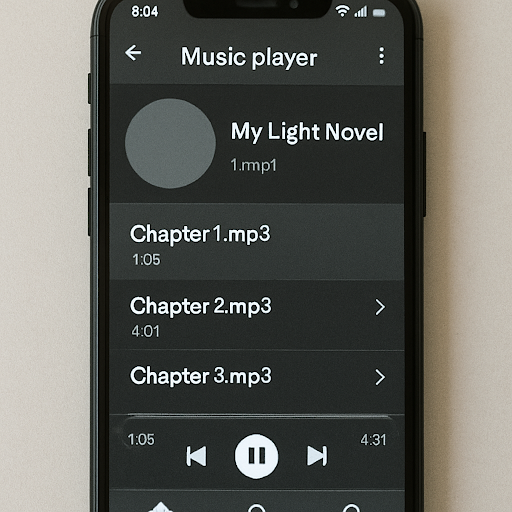
Step 4: Assembling Your Playlist
To listen to your book in order on your phone:
- Create a Folder: Title it with the novel's name.
- Organize Files: Save each chapter as
Chapter 01.mp3,Chapter 02.mp3, etc. - Create a Playlist: Transfer the folder to your phone and add the files to a playlist in your music app for a seamless, hands-free experience.
Bonus: Multi-Voice Audio Dramas
For big conversations, you can assign unique voices to the narrator, the hero, and the villain:
- Segmented Generation: Generate the narrator's lines in one voice and the dialogue in another.
- Emotion Settings: Use "angry," "sad," or "excited" tones to add depth to specific lines of dialogue.
Important: Copyright Rules
As you use these tools, remember one crucial rule: The audiobook you've made is for your personal enjoyment only.
- Strictly Private: Sharing these files online, sending them to friends, or selling them violates the author’s copyright.
- Ethical Use: Keeping your audiobook private respects the creators who brought you the story in the first place.
Your Next Step
You are now an AI audiobook producer. Start small: pick a single favorite chapter and bring it to life today.