How to Translate Manhwa to English Online (Complete Guide)
Ever waited weeks for the next chapter of your favorite manhwa? That delay is often because bringing a chapter to English isn't a one-person job. Fan translation, or scanlation, is a team sport with specialized roles, much like an assembly line.
The Scanlation Team Roles
- Translator: Converts the Korean dialogue to English.
- Cleaner/Redrawer (RD): Erases the original text and reconstructs the art behind it.
- Typesetter (TS): Places the English text into the bubbles.
- Proofreader: Ensures the final dialogue flows naturally.
Surprisingly, many of these roles don't require any Korean language skills. This guide breaks down the workflow from start to finish.
Step 1: How to Find 'Raws'
Every manhwa translation begins with “raws”—the original, untouched Korean chapter pages. High-quality raws are essential; blurry images are difficult to clean and result in a poor final product.
- Where to find them: Official Korean webtoon portals (like Naver or Kakao), fan communities, or specific raw provider sites.
Step 2: From Korean to English – Your Toolkit
To translate text locked inside an image, you can use this two-step digital process:
- OCR (Optical Character Recognition): Use an OCR tool to scan the image and convert the Korean characters into copyable text.
- Machine Translation: Paste the text into a translator.
- Recommendation: Papago is often superior to others for manhwa because it is developed by Naver and understands Korean webtoon slang and nuances better.
Note: Machine translations are only "rough drafts." A human proofreader is essential to fix tone and grammar.
Step 3: How to Clean and Redraw Panels
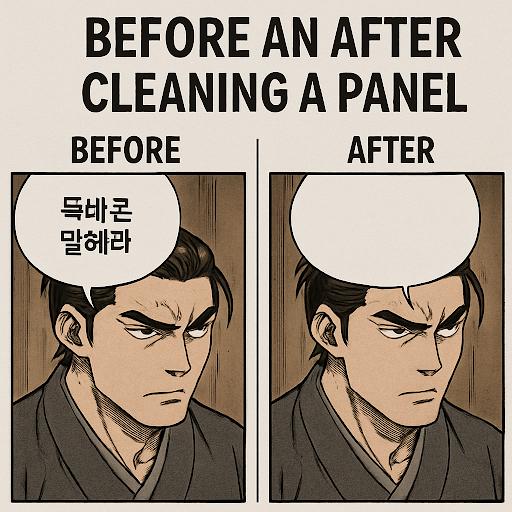
Before adding English, you must create a blank slate. This involves:
- Cleaning: Digitally erasing the original Korean text from speech bubbles.
- Redrawing (RD): When text covers the artwork, erasing it leaves a "hole." You must manually redraw the hidden background.
Tools: While professionals use Photoshop, Photopea is a powerful, free, web-based alternative perfect for beginners.
Step 4: The Art of Typesetting
Typesetting (TS) is the craft of placing the script into empty bubbles. It’s more than just pasting; it’s about choosing the right fonts and spacing to convey emotion.
- Tone Matters: A monster's roar needs a jagged, aggressive font, while a love confession should be soft and clean.
- Resources: You can find thousands of free comic-style fonts on sites like DaFont.
The Big Question: Is It Legal?
The short answer is no. Because comics are protected by copyright, translating and distributing them without permission is technically infringement.
The "Legal Gray Area"
However, the community generally follows a "gentleman's agreement" to stay in the good graces of publishers:
- Non-profit: Projects should not be sold.
- The "Licensed" Rule: The moment an official English version is announced (on platforms like Webtoon or Tappytoon), reputable teams cease their work and encourage readers to support the creator officially.
Your Next Step: From Reader to Creator
What once seemed like magic is now a clear roadmap. You don’t have to master every role at once—most people start by specializing in just one.
Ready to try? * Pick a single speech bubble.
- Try cleaning it in Photopea.
- Look for "Recruiting" pages at the end of your favorite manhwa chapters to join a group and learn from the pros.