How to Make Manga Mobile Friendly for Better Reading
Manga has long captivated readers with its unique storytelling and art style. With the surge of digital media, enthusiasts are increasingly turning to smartphones and tablets. To ensure a delightful experience, creators and publishers must optimize for smaller screens.
Why Optimize Manga for Mobile?
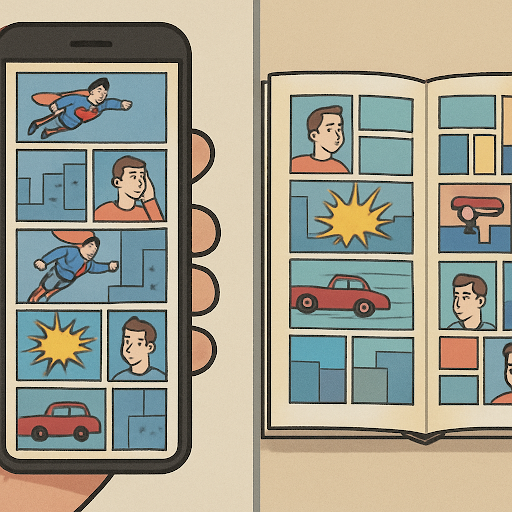
Traditional manga is designed for print. When pages are shrunk to fit a smartphone, text becomes difficult to read and artwork loses its impact. Mobile optimization makes manga accessible and enjoyable for a wider audience.
Embracing the Webtoon Format
One of the most effective ways to adapt is by adopting the webtoon format. This vertical scrolling layout is specifically designed for digital consumption, allowing readers to navigate through the story with a simple swipe.
Benefits of the Vertical Format
- Improved Readability: Larger text and images make it easier to engage with the story.
- Seamless Flow: Offers a continuous experience that keeps readers immersed.
- Touch Screen Optimized: Designed specifically for intuitive touch gestures.
Manga Apps: Enhancing the Mobile Experience
Manga apps are game-changers for mobile readers, providing interfaces tailored for small screens.
Popular Manga Reading Apps
| App | Best For |
|---|---|
| Webtoon | The industry leader in vertical-scroll webcomics. |
| Manga Plus | Officially licensed Shueisha titles with the latest chapters. |
| ComiXology | A versatile choice for both Western comics and manga. |
Key Features to Look For:
- Customization: Ability to adjust brightness, contrast, and font size.
- Offline Reading: Option to download chapters for reading on the go.
- Bookmarking: Easy tracking of reading history and progress.
Creating a Mobile-Friendly Manga Layout
To optimize manga for mobile, creators should rethink their approach to page design:
1. Simplify the Design
- Focus on Key Elements: Prioritize essential visuals and dialogue for clarity.
- Use White Space: Adequate spacing prevents panels from feeling cluttered.
2. Adjust Text and Speech Bubbles
- Larger Font Sizes: Ensure text is legible without needing to zoom in.
- Clear Bubbles: Keep bubble shapes simple to enhance comprehension.
3. Test Across Devices
Always test your layout on various screen sizes before release. This helps identify issues with panel scaling or text legibility on different hardware.
Conclusion
Making manga mobile-friendly is an essential step in reaching today's digital audience. Whether you are adopting the vertical scroll or utilizing dedicated apps, the goal is the same: ensuring the story remains accessible to readers everywhere.